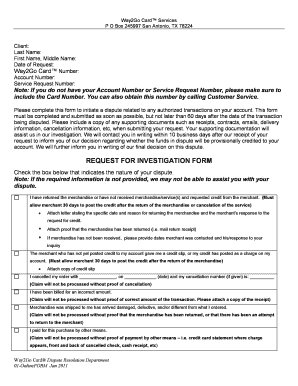
Way2go Card Dispute Transaction Form


What is the Way2go Card Dispute Transaction
The Way2go card dispute transaction is a formal process that allows cardholders to challenge unauthorized or incorrect charges made to their Way2go card. This card is often used for receiving government benefits, such as unemployment or child support. When a cardholder identifies a transaction that they believe is erroneous, they can initiate a dispute to seek resolution. The process ensures that consumers have a mechanism to protect their funds and maintain accurate financial records.
Steps to complete the Way2go Card Dispute Transaction
To effectively dispute a charge on your Way2go card, follow these steps:
- Review your transaction history to identify the specific charge you wish to dispute.
- Gather any relevant documentation, such as receipts or communication with the merchant.
- Contact the Way2go customer service team using the provided dispute number or email.
- Submit your dispute, including all necessary details and documentation, either online or via fax.
- Monitor the status of your dispute through the Way2go card tracking system.
How to use the Way2go Card Dispute Transaction
Using the Way2go card dispute transaction involves a straightforward process. Begin by accessing your account online or through the Way2go mobile app. Locate the transaction in question and select the option to dispute it. You will be prompted to provide details about the charge and any supporting documents. It is essential to be clear and concise in your explanation to facilitate a quicker resolution. After submission, keep track of your dispute status for updates.
Required Documents
When disputing a transaction on your Way2go card, certain documents may be required to support your claim. These typically include:
- A copy of your Way2go card statement highlighting the disputed transaction.
- Receipts or proof of purchase related to the transaction.
- Any correspondence with the merchant regarding the charge.
Having these documents ready can expedite the dispute process and enhance the likelihood of a favorable outcome.
Legal use of the Way2go Card Dispute Transaction
The Way2go card dispute transaction is governed by federal regulations that protect consumers against fraudulent or erroneous charges. Under the Fair Credit Billing Act, cardholders have the right to dispute charges and seek corrections. It is crucial to ensure that all disputes are filed within the designated time frame to comply with these legal protections. Understanding your rights can empower you when navigating the dispute process.
Form Submission Methods
There are several methods to submit your Way2go card dispute transaction. You can choose to file your dispute online through the Way2go website or mobile app, which is often the fastest method. Alternatively, you may submit your dispute via fax or traditional mail. Ensure that you include all required information and documentation regardless of the submission method you choose to avoid delays in processing your dispute.
Quick guide on how to complete way2go card dispute transaction
Accomplish Way2go Card Dispute Transaction effortlessly on any device
Digital document management has gained traction among businesses and individuals alike. It offers a superb eco-friendly substitute for conventional printed and signed documents, as it allows you to obtain the necessary form and securely store it online. airSlate SignNow provides all the tools you need to generate, modify, and eSign your documents quickly without complications. Handle Way2go Card Dispute Transaction on any device using the airSlate SignNow Android or iOS applications and enhance any document-driven process today.
The easiest method to modify and eSign Way2go Card Dispute Transaction with ease
- Find Way2go Card Dispute Transaction and click on Get Form to begin.
- Utilize the tools we provide to fill out your form.
- Emphasize pertinent sections of your documents or obscure sensitive information with tools that airSlate SignNow offers specifically for this purpose.
- Create your signature with the Sign tool, which takes mere seconds and holds the same legal validity as a traditional ink signature.
- Review the details and click on the Done button to save your modifications.
- Choose how you would like to send your form, by email, SMS, or invitation link, or download it to your computer.
Eliminate concerns about lost or misplaced files, tedious form hunting, or mistakes that necessitate printing new document copies. airSlate SignNow addresses all your document management needs in just a few clicks from any device of your choice. Modify and eSign Way2go Card Dispute Transaction and ensure outstanding communication at any stage of the form preparation process with airSlate SignNow.
Create this form in 5 minutes or less
Create this form in 5 minutes!
How to create an eSignature for the way2go card dispute transaction
How to create an electronic signature for a PDF online
How to create an electronic signature for a PDF in Google Chrome
How to create an e-signature for signing PDFs in Gmail
How to create an e-signature right from your smartphone
How to create an e-signature for a PDF on iOS
How to create an e-signature for a PDF on Android
People also ask
-
What is a Way2go Card Dispute Transaction?
A Way2go Card Dispute Transaction is a process that allows cardholders to challenge unauthorized or incorrect charges made on their Way2go card. This process ensures that users can protect their finances and get refunds for any fraudulent or mistaken transactions. Understanding how to initiate a dispute is crucial for effective financial management.
-
How can I initiate a Way2go Card Dispute Transaction?
To initiate a Way2go Card Dispute Transaction, you typically need to contact the customer service number provided on the back of your card or visit the Way2go website. You'll be required to provide details about the transaction you are disputing, including the date, amount, and a description of the issue. Ensuring you have all relevant information will help expedite the dispute process.
-
Are there any fees associated with a Way2go Card Dispute Transaction?
Usually, there are no fees for initiating a Way2go Card Dispute Transaction. However, it's always a good idea to review the cardholder agreement or contact customer service to confirm if any specific fees apply. Being aware of any potential costs can help you manage your finances more effectively.
-
What documents do I need for a Way2go Card Dispute Transaction?
For a Way2go Card Dispute Transaction, it's essential to gather any relevant documents that support your claim. This may include transaction receipts, account statements, and any correspondence related to the disputed charge. Having comprehensive documentation will strengthen your case and assist the resolution team in processing your dispute.
-
How long does it take to resolve a Way2go Card Dispute Transaction?
The resolution time for a Way2go Card Dispute Transaction can vary, but it typically takes around 10 to 45 days, depending on the complexity of the dispute. During this period, the issuing bank will investigate the claim and communicate updates. Patience is key, as thorough investigations are crucial for fair outcomes.
-
Can I dispute a pending Way2go Card transaction?
Yes, you can dispute a pending Way2go Card transaction, but the process may differ from disputing completed transactions. It’s best to contact customer service immediately to address the pending charge and clarify your concerns. Acting quickly increases the chances of a favorable resolution.
-
What happens if my Way2go Card Dispute Transaction is resolved in my favor?
If your Way2go Card Dispute Transaction is resolved in your favor, the disputed amount will be refunded to your account. You will receive a notification explaining the outcome and any adjustments made. This resolution process helps ensure that you are not held liable for unauthorized charges.
Get more for Way2go Card Dispute Transaction
Find out other Way2go Card Dispute Transaction
- Electronic signature Kentucky Non-Profit Stock Certificate Online
- Electronic signature Legal PDF Louisiana Online
- Electronic signature Maine Legal Agreement Online
- Electronic signature Maine Legal Quitclaim Deed Online
- Electronic signature Missouri Non-Profit Affidavit Of Heirship Online
- Electronic signature New Jersey Non-Profit Business Plan Template Online
- Electronic signature Massachusetts Legal Resignation Letter Now
- Electronic signature Massachusetts Legal Quitclaim Deed Easy
- Electronic signature Minnesota Legal LLC Operating Agreement Free
- Electronic signature Minnesota Legal LLC Operating Agreement Secure
- Electronic signature Oregon Non-Profit POA Free
- Electronic signature South Dakota Non-Profit Lease Agreement Template Online
- Electronic signature Missouri Legal Claim Online
- Can I Electronic signature Texas Non-Profit Permission Slip
- Electronic signature Utah Non-Profit Cease And Desist Letter Fast
- Electronic signature Missouri Legal Lease Agreement Template Free
- Electronic signature Non-Profit PDF Vermont Online
- Electronic signature Non-Profit PDF Vermont Computer
- Help Me With Electronic signature West Virginia Non-Profit Business Plan Template
- Electronic signature Nebraska Legal Living Will Simple